


Page 33 - Scratch Programming Playground
P. 33
X X the Costume center, which indicates the center of the cos-
                tume with the crosshairs symbol

            X X the Line width slider, which sets the width of the drawing
                tools

            X X the Color selector, which changes the color of the drawing
                tools

            X X the Zoom buttons for zooming into or out of the canvas
            X X the Undo and redo buttons, which can help you correct
                mistakes

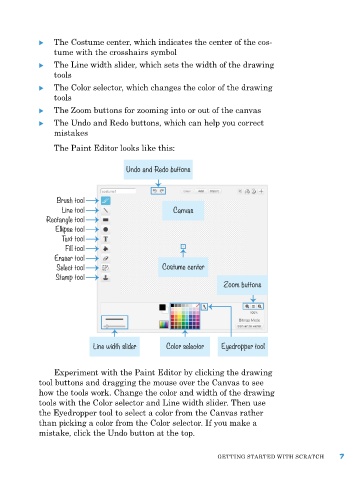
                the paint editor looks like this:

                                    Undo and Redo buttons


                 Brush tool
                  Line tool                      Canvas
              Rectangle tool
                Ellipse tool
                  Text tool
                   Fill tool
                Eraser tool
                 Select tool                  Costume center
                Stamp tool
                                                               Zoom buttons


                           Line width slider   Color selector  Eyedropper tool


                experiment with the paint editor by clicking the drawing
            tool buttons and dragging the mouse over the Canvas to see
            how the tools work. Change the color and width of the drawing
            tools with the Color selector and Line width slider. then use
            the eyedropper tool to select a color from the Canvas rather
            than picking a color from the Color selector. If you make a
            mistake, click the Undo button at the top.


                                                             GettING Started WIth SCratCh      7

