


Page 52 - Scratch Programming Playground
P. 52
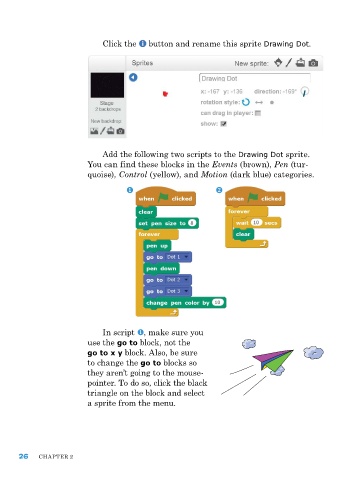
Click the button and rename this sprite Drawing Dot.
add the following two scripts to the Drawing Dot sprite.
You can find these blocks in the Events (brown), Pen (tur-
quoise), Control (yellow), and Motion (dark blue) categories.
In script , make sure you
use the go to block, not the
go to x y block. also, be sure
to change the go to blocks so
they aren’t going to the mouse-
pointer. To do so, click the black
triangle on the block and select
a sprite from the menu.
26 ChapTer 2

