


Page 49 - Scratch Programming Playground
P. 49
explore: Direction and
            Degrees


            words like up or right are perfectly understood as direc-
            tions by humans like you and me. But the computer needs a
            number to indicate an exact direction. all sprites in Scratch
            have their own direction number. The direction numbers are
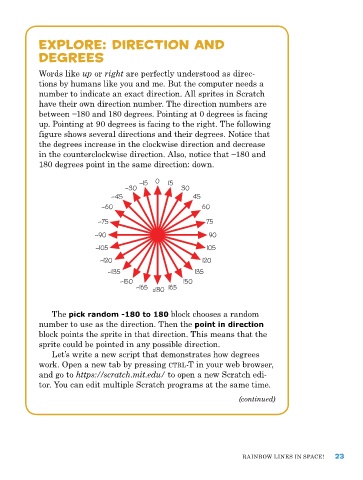
            between −180 and 180 degrees. Pointing at 0 degrees is facing
            up. pointing at 90 degrees is facing to the right. The following
            figure shows several directions and their degrees. notice that
            the degrees increase in the clockwise direction and decrease
            in the counter clockwise direction. Also, notice that −180 and
            180 degrees point in the same direction: down.

                                        –15  0  15
                                    –30            30
                                –45                    45
                             –60                         60

                            –75                           75
                           –90                             90
                            –105                          105
                             –120                        120
                               –135                    135
                                  –150              150
                                       –165  ±180  165


               The pick random -180 to 180 block chooses a random
            number to use as the direction. Then the point in direction
            block points the sprite in that direction. This means that the
            sprite could be pointed in any possible direction.
               Let’s write a new script that demonstrates how degrees
            work. open a new tab by pressing ctrl-T in your web browser,
            and go to https://scratch.mit.edu/ to open a new Scratch edi-
            tor. You can edit multiple Scratch programs at the same time.
                                                                   (continued)


                                                                    raInBow LIneS In SpaCe!   23

