


Page 188 - AutoCAD Dalam KEJURUTERAAN ELEKTRIK Dan ELEKTRONIK
P. 188
Type = Rectangular  Associative = Yes
               Select grip to edit array or [ASsociative/Base
               point/COUnt/Spacing/COLumns/Rows/Levels/eXit]<eXit>: b
               Specify base point or [Key point] <centroid>:
               Select grip to edit array or [ASsociative/Base
               point/COUnt/Spacing/COLumns/Rows/Levels/eXit]<eXit>: c
               Ambiguous response, please clarify...
               COUnt or COLumns? 4
               Point or option keyword required.
               Select grip to edit array or [ASsociative/Base
               point/COUnt/Spacing/COLumns/Rows/Levels/eXit]<eXit>: r
               Enter the number of rows or [Expression] <3>: 4
               Specify the distance between rows or [Total/Expression] <15>: 20
               Specify the incrementing elevation between rows or [Expresson] <0>: e
               Enter expression<0>: 1
               Select grip to edit array or [ASsociative/Base
               point/COUnt/Spacing/COLumns/Rows/Levels/eXit]<eXit>: cou
               Enter the number of columns or [Expression] <4>: 6
               Enter the number of rows or [Expression] <4>:

               Contoh
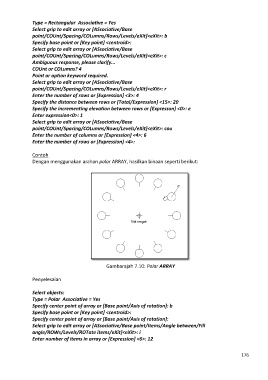
               Dengan menggunakan arahan polar ARRAY, hasilkan binaan seperti berikut:


                                                Gambarajah 7.10: Polar ARRAY

               Penyelesaian

               Select objects:
               Type = Polar  Associative = Yes
               Specify center point of array or [Base point/Axis of rotation]: b
               Specify base point or [Key point] <centroid>:
               Specify center point of array or [Base point/Axis of rotation]:
               Select grip to edit array or [ASsociative/Base point/Items/Angle between/Fill
               angle/ROWs/Levels/ROTate items/eXit]<eXit>: i
               Enter number of items in array or [Expression] <6>: 12


                                                                                                            176

