


Page 175 - Basic Course
P. 175
KNX BASIC COURSE

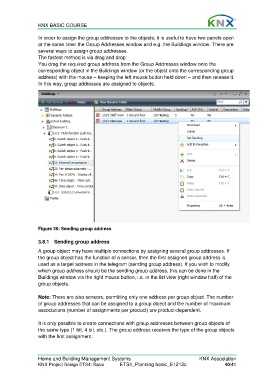
                  In order to assign the group addresses to the objects, it is useful to have two panels open
                  at the same time: the Group Addresses window and e.g. the Buildings window. There are
                  several ways to assign group addresses.
                  The fastest method is via drag and drop:
                  You drag the required group address from the Group Addresses window onto the
                  corresponding object in the Buildings window (or the object onto the corresponding group
                  address) with the mouse – keeping the left mouse button held down – and then release it.
                  In this way, group addresses are assigned to objects.


                  Figure 36: Sending group address

                  3.8.1  Sending group address

                  A group object may have multiple connections by assigning several group addresses. If
                  the group object has the function of a sensor, then the first assigned group address is
                  used as a target address in the telegram (sending group address). If you wish to modify
                  which group address should be the sending group address, this can be done in the
                  Buildings window via the right mouse button, i.e. in the list view (right window half) of the
                  group objects.

                  Note: There are also sensors, permitting only one address per group object. The number
                  of group addresses that can be assigned to a group object and the number of maximum
                  associations (number of assignments per product) are product-dependent.

                  It is only possible to create connections with group addresses between group objects of
                  the same type (1 bit, 4 bit, etc.). The group address receives the type of the group objects
                  with the first assignment.


                  Home and Building Management Systems                                    KNX Association
                  KNX Project Design ETS4: Basic      ETS4_Planning basic_E1212c                     40/41

