


Page 180 - Basic Course
P. 180
KNX BASIC COURSE

                  Advanced project design with ETS

                  NOTE: THIS CHAPTER IS INTENDED TO BE USED IN UPGRADE COURSES OR AS INFORMATIVE
                  ANNEX TO BASIC COURSES. THE CONTENTS IS NOT PART OF THE EXAM AT THE END OF THE
                  BASIC COURSE. ALL SUBSEQUENT SECTIONS REFER TO VERSION 4 OF ETS (ENGINEERING
                  TOOL SOFTWARE).


                  1 Foreword

                  The intention of this chapter is to show the advanced user of the KNX system the
                  possibilities of working even quicker with the “ETS” tool. It moreover contains important
                  advice about preliminary considerations during the planning stage and deals with the
                  responsibilities of a project engineer as regards documentation.

                  2  Workspaces, toolbars and Favorites


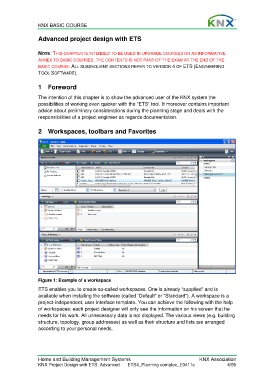
                  Figure 1: Example of a workspace
                  ETS enables you to create so-called workspaces. One is already “supplied” and is
                  available when installing the software (called “Default” or “Standard”). A workspace is a
                  project-independent, user interface template. You can achieve the following with the help
                  of workspaces: each project designer will only see the information on his screen that he
                  needs for his work. All unnecessary data is not displayed. The various views (e.g. building
                  structure, topology, group addresses) as well as their structure and lists are arranged
                  according to your personal needs.


                  Home and Building Management Systems                                    KNX Association
                  KNX Project Design with ETS: Advanced   ETS4_Planning complex_E0411c                4/59

