


Page 256 - Basic Course
P. 256
KNX BASIC COURSE


                  5 Unloading devices

                  If a device has been loaded by mistake, it is possible to unload it completely in the
                  commissioning menu via the “Unload” submenu, whereby there are two possibilities for
                  this function. The first option is to select “Unload application”: this will leave the individual
                  address untouched in the device. This process will not delete the entire program but
                  simply set all possible error flags. The other option includes the additional unloading of the
                  individual address. To do so, select “Unload address and application” from the menu
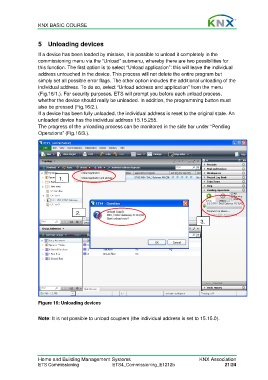
                  (Fig.16/1.). For security purposes, ETS will prompt you before each unload process,
                  whether the device should really be unloaded. In addition, the programming button must
                  also be pressed (Fig.16/2.).
                  If a device has been fully unloaded, the individual address is reset to the original state. An
                  unloaded device has the individual address 15.15.255.
                  The progress of the unloading process can be monitored in the side bar under “Pending
                  Operations” (Fig.16/3.).


                           1.


                                   2.
                                                                                          3.


                  Figure 16: Unloading devices


                  Note: It is not possible to unload couplers (the individual address is set to 15.15.0).


                  Home and Building Management Systems                                    KNX Association
                  ETS Commissioning                ETS4_Commissioning_E1212b                         21/24

