


Page 259 - Basic Course
P. 259
KNX BASIC COURSE


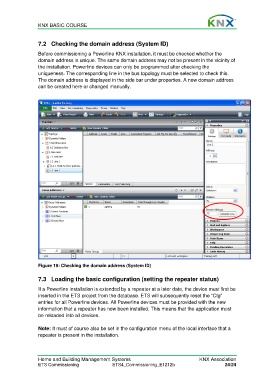
                  7.2  Checking the domain address (System ID)

                  Before commissioning a Powerline KNX installation, it must be checked whether the
                  domain address is unique. The same domain address may not be present in the vicinity of
                  the installation. Powerline devices can only be programmed after checking the
                  uniqueness. The corresponding line in the bus topology must be selected to check this.
                  The domain address is displayed in the side bar under properties. A new domain address
                  can be created here or changed manually.


                  Figure 19: Checking the domain address (System ID)

                  7.3 Loading the basic configuration (setting the repeater status)

                  If a Powerline installation is extended by a repeater at a later date, the device must first be
                  inserted in the ETS project from the database. ETS will subsequently reset the “Cfg”
                  entries for all Powerline devices. All Powerline devices must be provided with the new
                  information that a repeater has now been installed. This means that the application must
                  be reloaded into all devices.

                  Note: It must of course also be set in the configuration menu of the local interface that a
                  repeater is present in the installation.


                  Home and Building Management Systems                                    KNX Association
                  ETS Commissioning                ETS4_Commissioning_E1212b                         24/24

