


Page 209 - Advanced Course
P. 209
KNX ADVANCED COURSE

                  Example 2: A multifunction sensor, visualisation screen (touch panel) or a graphical
                  display can display the data of a KNX installation in a visual format. It can display for
                  example the states of the security functions or the monitored areas e.g. set, unset, ready
                  to set, tamper, fault and alarm or opened window.
                  However, modern visualisation screens have far more functions than a graphical display
                  for the user. Visualisation screens can be used as a central information system due to the
                  wide range of functions and options available.
                  Below are some examples for the different functions:

                      Sending emails (routing of signals e.g.: alarm, fault etc.)
                      Communication with the internet (remote access, status monitoring etc.)
                      Logic functions with an almost unlimited scope
                      Network camera
                      Door communication

                   Security and/or monitoring applications are extended by the use of e.g. network cameras.
                   Alarms or other signals can be sent via the internet. The user comfort can further be
                   increased as the user can check the state of his installation externally e.g. with a smart
                   phone.

                  2.4.5  KNX Zone Terminal
                  The KNX zone terminal is used to configure simple security and monitoring functions
                  using sensors from security technology. It is not possible however to install any intruder
                  alarm systems in the framework of the VdS regulation governing the prevention of
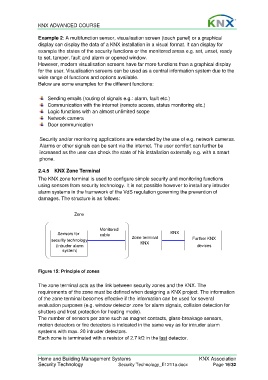
                  damages. The structure is as follows:

                                  Zone


                                             Monitored
                           Sensors for       cable                           KNX
                        security technology                 Zone terminal             Further KNX
                                                               KNX
                          (intruder alarm                                                devices
                             system)


                  Figure 15: Principle of zones

                  The zone terminal acts as the link between security zones and the KNX. The
                  requirements of the zone must be defined when designing a KNX project. The information
                  of the zone terminal becomes effective if the information can be used for several
                  evaluation purposes (e.g. window detector zone for alarm signals, collision detection for
                  shutters and frost protection for heating mode).
                  The number of sensors per zone such as magnet contacts, glass-breakage sensors,
                  motion detectors or fire detectors is indicated in the same way as for intruder alarm
                  systems with max. 20 intruder detectors.
                  Each zone is terminated with a resistor of 2.7 kΩ in the last detector.


                  Home and Building Management Systems                                    KNX Association
                  Security Technology                 Security Technology_E1211a.docx           Page 16/32

