


Page 16 - Executive Director
P. 16
8002 - Bad Debt Write-Off’s


               Result Statement:            To eliminate the amount of past due money owed past 115 days.  Write
                                            offs will minimally affect monthly VSD numbers and overall result is a
                                            well-managed accounts receivable that is at industry standard or below.


               Primary Responsible Position:  Executive Director

               Why:                         To reduce the amount of accounts receivable past due that are no
                                            longer able to be collected.  Severely old Debit will no longer be a
                                            factor. Bad debt accounts are now written off quickly.

                                                     th
               When:                        By the 10  of each month.

               What to Do:                  Account Write Off in AVIMARK
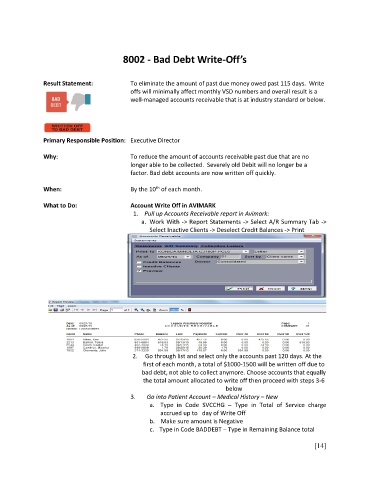
                                             1.    Pull up Accounts Receivable report in Avimark:
                                                a.  Work With -> Report Statements -> Select A/R Summary Tab ->
                                                   Select Inactive Clients -> Deselect Credit Balances -> Print


                                             2.     Go through list and select only the accounts past 120 days. At the
                                                first of each month, a total of $1000-1500 will be written off due to
                                                bad debt, not able to collect anymore. Choose accounts that equally
                                                the total amount allocated to write off then proceed with steps 3-6
                                                                            below
                                            3.    Go into Patient Account – Medical History – New
                                                   a.  Type  in  Code  SVCCHG  –  Type  in  Total  of  Service  charge
                                                      accrued up to   day of Write Off
                                                   b.    Make sure amount is Negative
                                                   c.   Type in Code BADDEBT – Type in Remaining Balance total

                                                                                                         [14]

