


Page 125 - digitalliteracy
P. 125
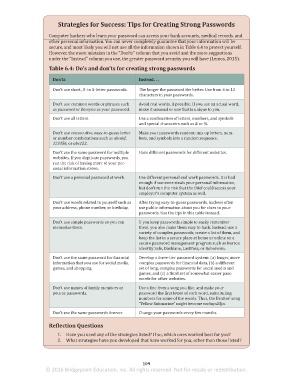
Strategies for Success: Tips for Creating Strong Passwords


                          Computer hackers who learn your password can access your bank accounts, medical records, and
 Gaming Websites          other personal information. You can never completely guarantee that your information will be
                          secure, and most likely you will not use all the information shown in Table 6.4 to protect yourself.
 Many people enjoy playing interactive games such as Words With Friends or popular games
                          However, the more mistakes in the “Don’ts” column that you avoid and the more suggestions
 produced  by companies such as PopCap, Y8,  Pogo, or Zynga.  These  games can  be  played
                          under the “Instead” column you use, the greater password security you will have (Lemos, 2015).
 against people you know or whom you have never met who just happen to be online when
 you want to play. Some of these games include gambling—with real money changing hands;   Table 6.4: Do’s and don’ts for creating strong passwords
 others are just for fun. In a massively multiplayer online game (MMO or MMOG) and a mas-
                           Don’ts                              Instead. . .
 sively multiplayer online role playing game (MMORPG), you may play against a large online
 community of anonymous strangers and have unmoderated discussions, which pose a danger
                           Don’t use short, 3- to 5-letter passwords.  The longer the password the better. Use from 6 to 12
 of inadvertently giving away personal information about yourself (Get Safe Online, 2015).   characters in your passwords.
 Some of the hidden dangers of such sites are outlined here.
                           Don’t use common words or phrases such   Avoid real words, if possible. If you use an actual word,
                           as password or iloveyou as your password.  make it unusual or one that is unique to you.
 •  Until they download a particular game, many people are unaware that a game con-
 tains violent or sexual content. If you have children who can access your computer,   Don’t use all letters.  Use a combination of letters, numbers, and symbols
 you can set parental controls on your Windows or Mac OS X operating system to   and special characters such as & or %.
 prevent access to sites that have such games.  Don’t use consecutive, easy-to-guess letter   Make your passwords random; mix up letters, num-
 •  Most of these websites allow you to assume a false identity. So you never know if you   or number combinations such as abcdef,   bers, and symbols into a random sequence.
 are online with a sexual predator or other person who is interested in more than just   123456, or abc123.
 playing games.
                           Don’t use the same password for multiple   Have different passwords for different websites.
 •  Do not download “cheats” (offers to buy programs or files that claim to give you an   websites. If you duplicate passwords, you
 advantage over other players). They may contain malware or computer viruses.  run the risk of having more of your per-
 •  Play only authorized versions of a game, which you have purchased from a repu-  sonal information stolen.
 table source and for which you have a software license. Do not use pirated copies of
                           Don’t use a personal password at work.  Use different personal and work passwords. It is bad
 games, which are illegal, can incur criminal penalties, and may contain malware.  enough if someone steals your personal information,
 •  Play online games only when you have updated antispyware and antivirus software   but don’t run the risk that the thief could access your
 running and an effective firewall—which is a network security software system that   employer’s computer system as well.
 protects the computer network from harmful information from other computers or
                           Don’t use words related to yourself such as   After trying easy-to-guess passwords, hackers often
 the Internet—on your computer.  your address, phone number, or birthday.  use public information about you for clues to your
 •  Choose a user name that does not reveal any personal information, and don’t put any   passwords. Use the tips in this table instead.
 revealing personal information on your game profile.
                           Don’t use simple passwords so you can   If you keep passwords simple to easily remember
 •  Use strong passwords that make it difficult for hackers to figure out. Use the tips in
                           memorize them.                      them, you also make them easy to hack. Instead, use a
 Strategies for Success: Tips for Creating Strong Passwords to create your passwords.  variety of complex passwords, create a list of them, and
 •  Watch out for scams and cons that can occur when online game players try to sell or   keep the list in a secure place at home or online on a
 buy items outside the computer game, in the real world (Get Safe Online, 2015).  secure password management program such as Norton
                                                               Identity Safe, Dashlane, LastPass, or RoboForm.

                           Don’t use the same password for financial   Develop a three-tier password system: (a) longer, more
                           information that you use for social media,   complex passwords for financial data, (b) a different
                           games, and shopping.                set of long, complex passwords for social media and
                                                               games, and (c) a third set of somewhat easier pass-
                                                               words for other websites.
                           Don’t use names of family members or   Use a line from a song you like, and make your
                           pets as passwords.                  password the first letter of each word, substituting
                                                               numbers for some of the words. Thus, the Beatles’ song
                                                               “Yellow Submarine” might become waliays25ys.

                           Don’t use the same passwords forever.  Change your passwords every few months.
                          Reflection Questions


                             1.  Have you used any of the strategies listed? If so, which ones worked best for you?
                             2.  What strategies have you developed that have worked for you, other than those listed?


                                                                 109
                        © 2016 Bridgepoint Education, Inc. All rights reserved. Not for resale or redistribution.


       sol82612_06_m06_097-120.indd   109                                                                            6/29/16   5:14 PM

