


Page 44 - digitalliteracy
P. 44
2.1  Which Hardware Is Right for You?


                       Consider Speed, Processing Power, Memory, and Storage Space

                       You may have heard people use terms like kilobits, kilobytes, megabits, or megabytes when
                       they talk about computers. Both bits and bytes are units of measurement in computer lan-
                       guage, and they determine the speed and processing power of computer devices, as well as
                       the memory and storage capacity of electronic devices.


                       Bits are measurements of the speed at which the computer performs calculations or transfers
                       data. For example, a computer may have a 32-bit or 64-bit processor, or an Internet service
                       provider may advertise that it offers download speeds of 60 megabits per second (abbrevi-
                       ated Mbits per second or Mbps). Generally, the more bits per second, the faster and more
                       powerful the device. Bytes (pronounced “bites”) are measurements of the size or capacity
                       of a computer file and the computer memory or storage devices. For example, you may have
                       a computer that has a 500-gigabyte hard drive to store data. Generally, the more bytes, the
                       greater a computer file’s size or the computer data storage’s capacity. Because the term bytes
                       is used most frequently to describe computer hardware, a handy reference chart of the names,
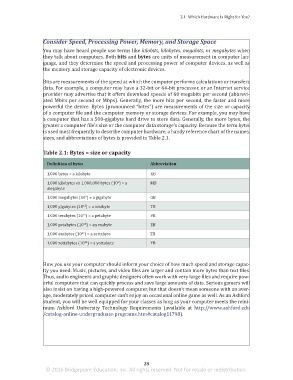
                       sizes, and abbreviations of bytes is provided in Table 2.1.


                       Table 2.1: Bytes = size or capacity

                         Definition of bytes                        Abbreviation

                         1,000 bytes = a kilobyte                   KB
                                                      6
                         1,000 kilobytes or 1,000,000 bytes (10 ) = a   MB
                         megabyte
                                         9
                         1,000 megabytes (10 ) = a gigabyte         GB
                                        12
                         1,000 gigabytes (10 ) = a terabyte         TB
                                        15
                         1,000 terabytes (10 ) = a petabyte         PB
                                        18
                         1,000 petabytes (10 ) = an exabyte         EB
                                       21
                         1,000 exabytes (10 ) = a zettabyte         ZB
                                         24
                         1,000 zettabytes (10 ) = a yottabyte       YB


                       How you use your computer should inform your choice of how much speed and storage capac-
                       ity you need. Music, pictures, and video files are larger and contain more bytes than text files.
                       Thus, audio engineers and graphic designers often work with very large files and require pow-
                       erful computers that can quickly process and save large amounts of data. Serious gamers will
                       also insist on having a high-powered computer, but that doesn’t mean someone with an aver-
                       age, moderately priced computer can’t enjoy an occasional online game as well. As an Ashford
                       student, you will be well equipped for your classes as long as your computer meets the mini-
                       mum Ashford University Technology Requirements (available at  http://www.ashford.edu
                       /catalog-online-undergraduate-programs.htm#catalog11798).


                                                                 28
                        © 2016 Bridgepoint Education, Inc. All rights reserved. Not for resale or redistribution.


       sol82612_02_m02_021-046.indd   28                                                                             6/29/16   5:11 PM

