


Page 142 - Computing E-Book Grade 6
P. 142
The City School  2021-2022


             5.8.  Creating Relationships in MS Access


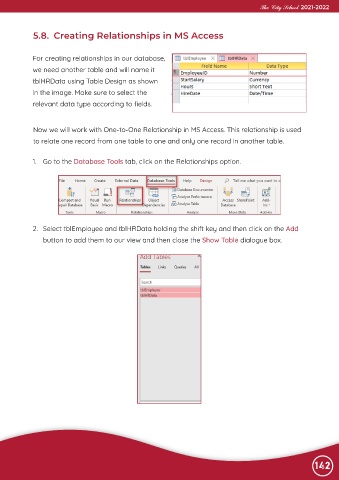
             For creating relationships in our database,
             we need another table and will name it

             tblHRData using Table Design as shown
             in the image. Make sure to select the

             relevant data type according to fields.


             Now we will work with One-to-One Relationship in MS Access. This relationship is used

             to relate one record from one table to one and only one record in another table.


             1.  Go to the Database Tools tab, click on the Relationships option.


             2.  Select tblEmployee and tblHRData holding the shift key and then click on the Add

                button to add them to our view and then close the Show Table dialogue box.


                                                                                                                142

