


Page 143 - Computing E-Book Grade 6
P. 143
The City School  2021-2022


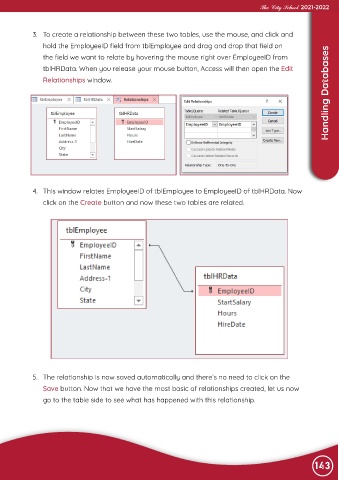
             3.  To create a relationship between these two tables, use the mouse, and click and

                hold the EmployeeID field from tblEmployee and drag and drop that field on
                                                                                                                    Handling Databases
                the field we want to relate by hovering the mouse right over EmployeeID from

                tblHRData. When you release your mouse button, Access will then open the Edit
                Relationships window.


             4.  This window relates EmployeeID of tblEmployee to EmployeeID of tblHRData. Now
                click on the Create button and now these two tables are related.


             5.  The relationship is now saved automatically and there’s no need to click on the
                Save button. Now that we have the most basic of relationships created, let us now
                go to the table side to see what has happened with this relationship.


                                                                                                                143

