


Page 95 - Computing E-Book Grade 3
P. 95
The City School  2021-2022


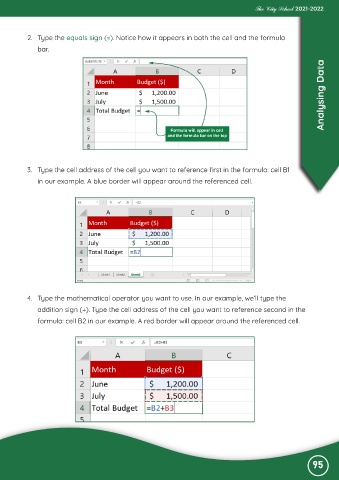
           2.  Type the equals sign (=). Notice how it appears in both the cell and the formula

              bar.

                                                                                                                   Analysing Data


           3.  Type the cell address of the cell you want to reference first in the formula: cell B1
              in our example. A blue border will appear around the referenced cell.


           4.  Type the mathematical operator you want to use. In our example, we’ll type the

              addition sign (+). Type the cell address of the cell you want to reference second in the
              formula: cell B2 in our example. A red border will appear around the referenced cell.


                                                                                                               95

