


Page 94 - Computing E-Book Grade 3
P. 94
The City School  2021-2022


           6.6.  Working with Formulas in Excel


           One of the most powerful features in Excel is the                                    +

           ability to calculate numerical information                 1       /        *
           using formulas. Just like a calculator, Excel can

           add, subtract, multiply, and divide. Excel uses
           standard operators for formulas, such as a plus       20                              15

           sign for addition (+), a minus sign for                                 -
           subtraction (-), an asterisk for multiplication (*)

           and a forward slash for division (/).
           All formulas in Excel must begin with an equality

           sign (=). This is because the cell contains, or is equal to, the formula and the value it
           calculates.


           Creating Simple Formula in Excel


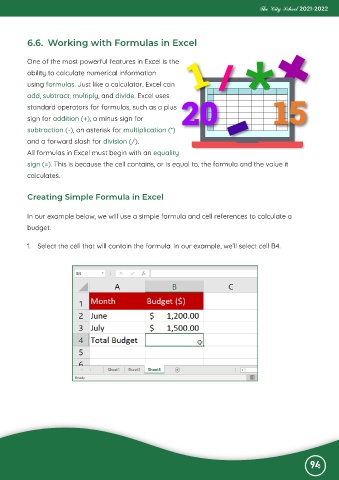
           In our example below, we will use a simple formula and cell references to calculate a

           budget.


           1.  Select the cell that will contain the formula. In our example, we’ll select cell B4.


                                                                                                              94

