


Page 526 - Windows 10 May 2019 Update The Missing Manual: The Book That Should Have Been in the Box
P. 526
capturing photos and GPS data. So far, it’s done so only in the most

                populated areas of the U.S. and Europe, but it has big plans.)

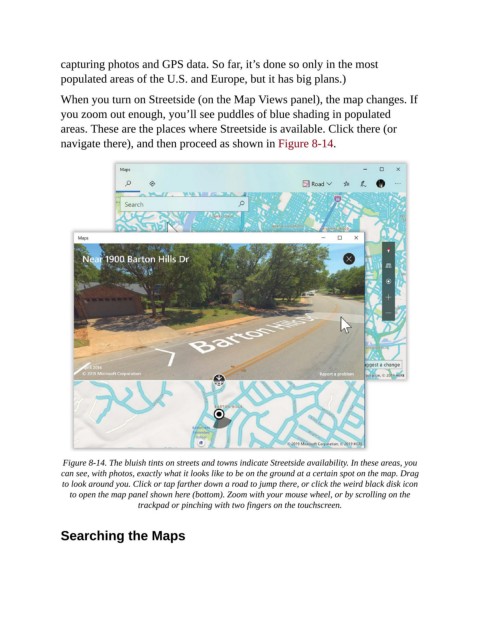
                When you turn on Streetside (on the Map Views panel), the map changes. If
                you zoom out enough, you’ll see puddles of blue shading in populated
                areas. These are the places where Streetside is available. Click there (or

                navigate there), and then proceed as shown in Figure 8-14.


                 Figure 8-14. The bluish tints on streets and towns indicate Streetside availability. In these areas, you
                can see, with photos, exactly what it looks like to be on the ground at a certain spot on the map. Drag
                 to look around you. Click or tap farther down a road to jump there, or click the weird black disk icon
                   to open the map panel shown here (bottom). Zoom with your mouse wheel, or by scrolling on the
                                    trackpad or pinching with two fingers on the touchscreen.


                Searching the Maps

