


Page 54 - Windows 10 May 2019 Update The Missing Manual: The Book That Should Have Been in the Box
P. 54
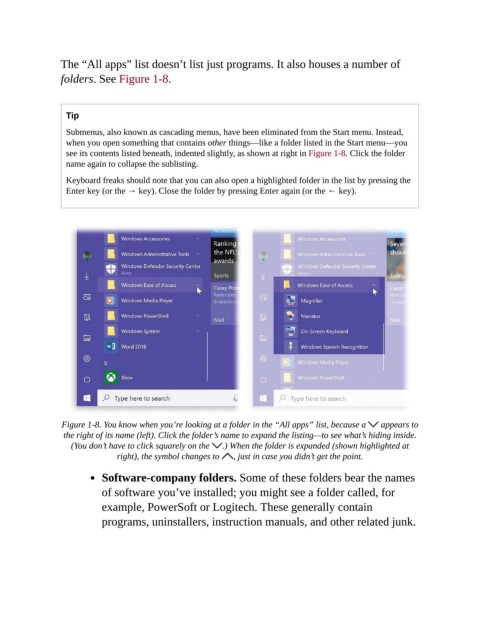
The “All apps” list doesn’t list just programs. It also houses a number of

                folders. See Figure 1-8.


                  Tip
                  Submenus, also known as cascading menus, have been eliminated from the Start menu. Instead,
                  when you open something that contains other things—like a folder listed in the Start menu—you
                  see its contents listed beneath, indented slightly, as shown at right in Figure 1-8. Click the folder
                  name again to collapse the sublisting.

                  Keyboard freaks should note that you can also open a highlighted folder in the list by pressing the
                  Enter key (or the → key). Close the folder by pressing Enter again (or the ← key).


                 Figure 1-8. You know when you’re looking at a folder in the “All apps” list, because a    appears to
                 the right of its name (left). Click the folder’s name to expand the listing—to see what’s hiding inside.
                   (You don’t have to click squarely on the   .) When the folder is expanded (shown highlighted at
                               right), the symbol changes to   , just in case you didn’t get the point.

                           Software-company folders. Some of these folders bear the names

                           of software you’ve installed; you might see a folder called, for
                           example, PowerSoft or Logitech. These generally contain
                           programs, uninstallers, instruction manuals, and other related junk.

