


Page 629 - Windows 10 May 2019 Update The Missing Manual: The Book That Should Have Been in the Box
P. 629
You can also press the   and   keys to scroll. Page Up and Page Down

                scroll in full-screen increments, while Home and End whisk you to the top
                or bottom of the page.


                Tabbed Browsing


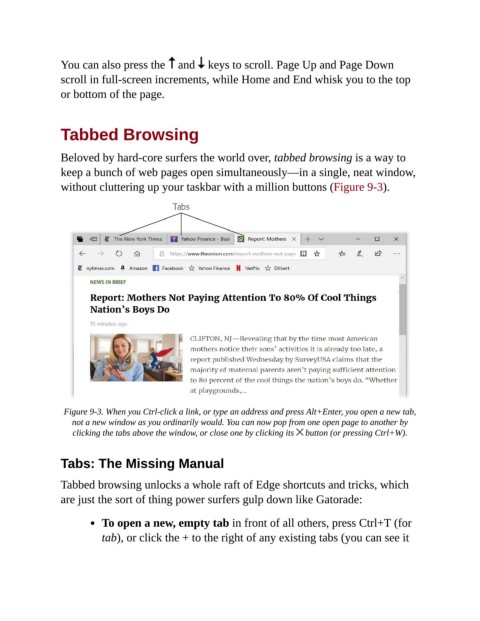
                Beloved by hard-core surfers the world over, tabbed browsing is a way to
                keep a bunch of web pages open simultaneously—in a single, neat window,

                without cluttering up your taskbar with a million buttons (Figure 9-3).


                 Figure 9-3. When you Ctrl-click a link, or type an address and press Alt+Enter, you open a new tab,
                   not a new window as you ordinarily would. You can now pop from one open page to another by
                   clicking the tabs above the window, or close one by clicking its   button (or pressing Ctrl+W).


                Tabs: The Missing Manual

                Tabbed browsing unlocks a whole raft of Edge shortcuts and tricks, which

                are just the sort of thing power surfers gulp down like Gatorade:

                           To open a new, empty tab in front of all others, press Ctrl+T (for

                           tab), or click the + to the right of any existing tabs (you can see it

