


Page 53 - Jetpower (January 2020)
P. 53
050-051 iGyro SAT:Layout 1 Englisch  09.01.2020  13:55 Uhr  Seite 51


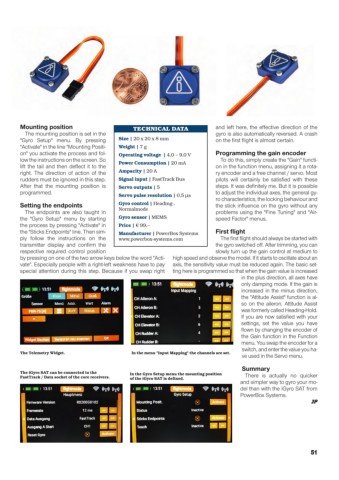
              Mounting position                       TECHNICAL DATA               and left here, the effective direction of the
                The mounting position is set in the                                gyro is also automatically reversed. A crash
              "Gyro Setup" menu. By pressing     Size | 20 x 20 x 8 mm             on the first flight is almost certain.
              "Activate" in the line "Mounting Positi-  Weight | 7 g
              on" you activate the process and fol-  Operating voltage | 4,0 – 9,0 V  Programming the gain encoder
              low the instructions on the screen. So                                To do this, simply create the "Gain" functi-
                                                 Power Consumption | 20 mA
              lift the tail and then deflect it to the                              on in the function menu, assigning it a rota-
              right. The direction of action of the  Ampacity | 20 A               ry encoder and a free channel / servo. Most
              rudders must be ignored in this step.  Signal input | FastTrack Bus  pilots will certainly be satisfied with these
              After that the mounting position is  Servo outputs | 5               steps. It was definitely me. But it is possible
              programmed.                                                          to adjust the individual axes, the general gy-
                                                 Servo pulse resolution | 0,5 µs
                                                                                   ro characteristics, the locking behaviour and
              Setting the endpoints              Gyro control | Heading-,          the stick influence on the gyro without any
                                                 Normalmode
                The endpoints are also taught in                                   problems using the "Fine Tuning" and "Air-
              the "Gyro Setup" menu by starting  Gyro sensor | MEMS                speed Factor" menus.
              the process by pressing "Activate" in  Price | € 99,–
              the "Sticks Endpoints" line. Then sim-  Manufacturer | PowerBox Systems  First flight
              ply follow the instructions on the  www.powerbox-systems.com          The first flight should always be started with
              transmitter display and confirm the                                   the gyro switched off. After trimming, you can
              respective required control position                                 slowly turn up the gain control at medium to
              by pressing on one of the two arrow keys below the word "Acti-  high speed and observe the model. If it starts to oscillate about an
              vate". Especially people with a right-left weakness have to pay  axis, the sensitivity value must be reduced again. The basic set-
              special attention during this step. Because if you swap right  ting here is programmed so that when the gain value is increased
                                                                                            in the plus direction, all axes have
                                                                                            only damping mode. If the gain is
                                                                                            increased in the minus direction,
                                                                                            the "Attitude Assist" function is al-
                                                                                            so on the aileron. Attitude Assist
                                                                                            was formerly called Heading-Hold.
                                                                                            If you are now satisfied with your
                                                                                            settings, set the value you have
                                                                                            flown by changing the encoder of
                                                                                            the Gain function in the Function
                                                                                            menu. You swap the encoder for a
                                                                                            switch, and enter the value you ha-
              The Telemetry Widget.                  In the menu "Input Mapping" the channels are set.
                                                                                            ve used in the Servo menu.
                                                                                            Summary
              The iGyro SAT can be connected to the  In the Gyro Setup menu the mounting position
              FastTrack / Data socket of the core receivers.  of the iGyro SAT is defined.   There is actually no quicker
                                                                                           and simpler way to gyro your mo-
                                                                                           del than with the iGyro SAT from
                                                                                           PowerBox Systems.
                                                                                                                     JP


                                                                                                                    51

