


Page 40 - 18-868 SEO PowerSuite Workflow_VPMGC
P. 40
SEO Workflow


               Tip: Look for orphan pages (pages that are not linked to internally). WebSite

               Auditor can help you find the pages on your site that aren’t linked to internally,
               and thus impossible to find for both users and search engines.


               To find orphan pages on your site, you’ll need to rebuild your WebSite Auditor

               project. To do this, go to the Pages module and click                 .


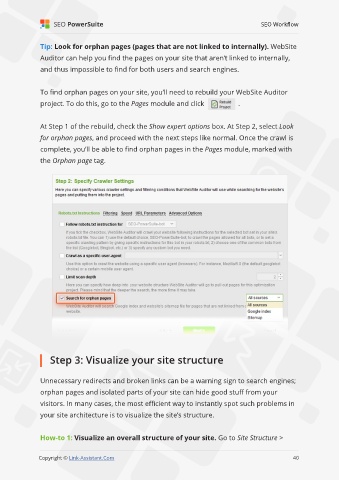
               At Step 1 of the rebuild, check the Show expert options box. At Step 2, select Look
               for orphan pages, and proceed with the next steps like normal. Once the crawl is

               complete, you’ll be able to find orphan pages in the Pages module, marked with
               the Orphan page tag.


                   Step 3: Visualize your site structure


               Unnecessary redirects and broken links can be a warning sign to search engines;

               orphan pages and isolated parts of your site can hide good stuff from your
               visitors. In many cases, the most efficient way to instantly spot such problems in

               your site architecture is to visualize the site’s structure.


               How-to 1: Visualize an overall structure of your site. Go to Site Structure >
                                                                                                             40

               Copyright © Link-Assistant.Com                                                           40

