


Page 37 - 18-868 SEO PowerSuite Workflow_VPMGC
P. 37
SEO Workflow


               Tip:  Crawl your site as Googlebot (or any other bot). By default, WebSite

               Auditor crawls your site using a spider called SEO-PowerSuite-bot, which
               means it will obey robots instructions for all bots (user agent: *). You may want

               to tweak this setting to crawl the site as Google, Bing, Yahoo, etc. – or discard
               robots instructions altogether and collect all pages of your site, even the ones

               disallowed in your robots.txt.


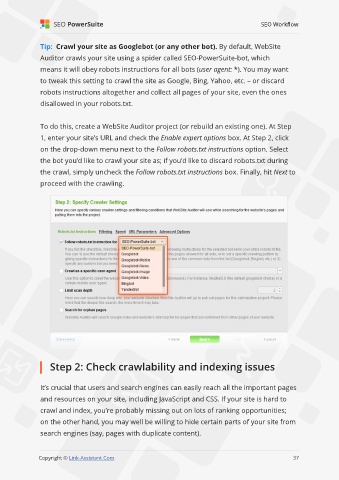
               To do this, create a WebSite Auditor project (or rebuild an existing one). At Step
               1, enter your site’s URL and check the Enable expert options box. At Step 2, click

               on the drop-down menu next to the Follow robots.txt instructions option. Select
               the bot you’d like to crawl your site as; if you’d like to discard robots.txt during

               the crawl, simply uncheck the Follow robots.txt instructions box. Finally, hit Next to
               proceed with the crawling.


                   Step 2: Check crawlability and indexing issues


               It’s crucial that users and search engines can easily reach all the important pages
               and resources on your site, including JavaScript and CSS. If your site is hard to

               crawl and index, you’re probably missing out on lots of ranking opportunities;
               on the other hand, you may well be willing to hide certain parts of your site from

               search engines (say, pages with duplicate content).

                                                                                                             37

               Copyright © Link-Assistant.Com                                                           37

