


Page 14 - Dometic RM Series Refrigerators Service Manual
P. 14
14


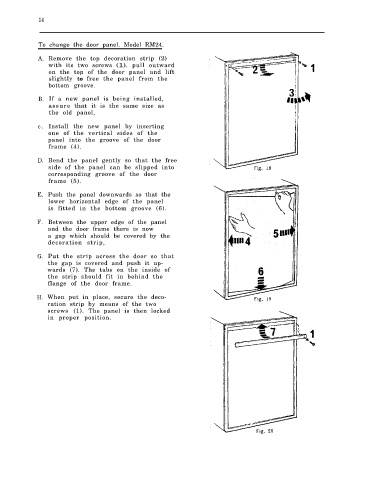
              To change the door panel. Model RM24.

              A. Remove the top decoration strip (2)
                 with its two screws (1).    pull outward
                 on the top of the door panel and lift
                 slightly to free the panel from the
                 bottom groove.

              B. If a new panel is being installed,
                 assure   that  it is the same size as
                 the old panel,
              c . Install the new panel by inserting
                 one of the vertical sides of the
                 panel into the groove of the door
                 frame (4).
              D. Bend the panel gently so that the free
                 side of the panel can be slipped into
                 corresponding groove of the door
                 frame (5).

              E. Push the panel downwards so that the
                 lower horizontal edge of the panel
                 is fitted in the bottom groove (6).

             F. Between the upper edge of the panel
                 and the door frame there is now
                 a gap which should be covered by the
                 decoration strip,
             G. Put the strip across the door so that
                 the gap is covered and push it up-
                 wards (7). The tabs on the inside of
                 the strip should fit in behind the
                 flange of the door frame.

             H. When put in place, secure the deco-
                 ration strip by means of the two
                 screws (1). The panel is then locked
                 in proper position.

