


Page 12 - Installation Manual - GenII DTS
P. 12
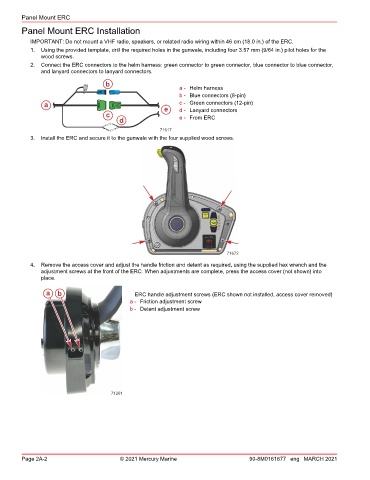
Panel Mount ERC
        Panel Mount ERC Installation

           IMPORTANT: Do not mount a VHF radio, speakers, or related radio wiring within 46 cm (18.0 in.) of the ERC.
           1.  Using the provided template, drill the required holes in the gunwale, including four 3.57 mm (9/64 in.) pilot holes for the
               wood screws.
           2.  Connect the ERC connectors to the helm harness: green connector to green connector, blue connector to blue connector,
               and lanyard connectors to lanyard connectors.
                                    b
                                                            a - Helm harness
                                                            b - Blue connectors (8‑pin)
                a                                      e    c - Green connectors (12‑pin)
                                                            d - Lanyard connectors
                                    c                       e - From ERC
                                        d
                                                      71617
           3.  Install the ERC and secure it to the gunwale with the four supplied wood screws.


                                                                            71672
           4.  Remove the access cover and adjust the handle friction and detent as required, using the supplied hex wrench and the
               adjustment screws at the front of the ERC. When adjustments are complete, press the access cover (not shown) into
               place.


                a   b                         ERC handle adjustment screws (ERC shown not installed, access cover removed)
                                            a - Friction adjustment screw
                                            b - Detent adjustment screw


                                      71261


        Page 2A-2                        © 2021 Mercury Marine                      90-8M0161677 eng MARCH 2021

