


Page 16 - Installation Manual - GenII DTS
P. 16
Console Mount ERC—Single Handle
        Single Console ERC Installation

           IMPORTANT: Do not mount a VHF radio, speakers, or related radio wiring within 46 cm (18.0 in.) of the ERC.
           IMPORTANT: The ERC can be through‑bolted using the supplied mounting hardware (six screws, six washers, and six nuts) or
           mounted to the console using six 12 x 1.25 wood screws (purchased separately). Be sure to drill the correct size pilot holes for
           the selected mounting method.
           1.  Using the provided template, drill the required holes in the console.
               a.  When through‑bolting using the supplied mounting hardware, drill six 5.56 mm (7/32 in.) holes.
               b.  When using the optional (purchased separately) 12 x 1.25 wood screws, drill six 3.97 mm (5/32 in.) pilot holes.
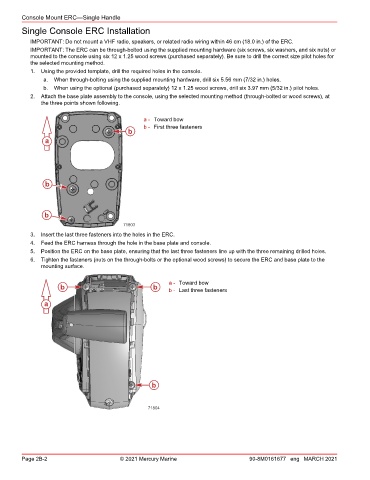
           2.  Attach the base plate assembly to the console, using the selected mounting method (through‑bolted or wood screws), at
               the three points shown following.


                                                 a - Toward bow
                                                 b - First three fasteners
                                           b
                a


                b


                b
                                          71803
           3.  Insert the last three fasteners into the holes in the ERC.
           4.  Feed the ERC harness through the hole in the base plate and console.
           5.  Position the ERC on the base plate, ensuring that the last three fasteners line up with the three remaining drilled holes.
           6.  Tighten the fasteners (nuts on the through‑bolts or the optional wood screws) to secure the ERC and base plate to the
               mounting surface.


                                                         a - Toward bow
                     b                              b    b - Last three fasteners

                a


                                                   b


                                                  71804


        Page 2B-2                        © 2021 Mercury Marine                      90-8M0161677 eng MARCH 2021

