


Page 88 - Computing Book 7
P. 88
Mobile App Development – App Lab                                                     Class 7


                                       Mobile App Development – App Lab

               What is Applab?

               Making your own apps is easy with App Lab! Whether you're new to coding or have some
               experience. App Lab is a great tool for building new apps and sharing them with your friends.

               Getting Started:

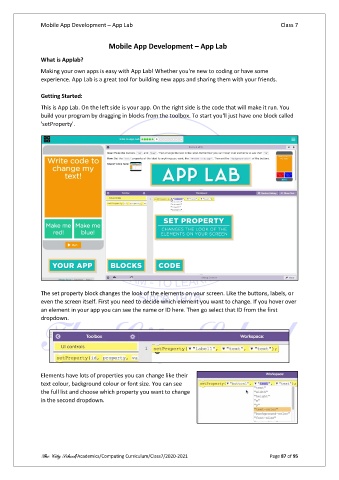
               This is App Lab. On the left side is your app. On the right side is the code that will make it run. You
               build your program by dragging in blocks from the toolbox. To start you'll just have one block called
               'setProperty'.


               The set property block changes the look of the elements on your screen. Like the buttons, labels, or
               even the screen itself. First you need to decide which element you want to change. If you hover over
               an element in your app you can see the name or ID here. Then go select that ID from the first
               dropdown.


               Elements have lots of properties you can change like their
               text colour, background colour or font size. You can see
               the full list and choose which property you want to change
               in the second dropdown.


               The City School/Academics/Computing Curriculum/Class7/2020-2021                  Page 87 of 95

