


Page 91 - Computing Book 7
P. 91
Mobile App Development – App Lab                                                     Class 7


               Adding Sound:


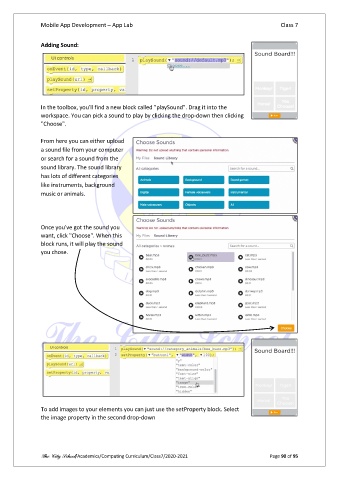
               In the toolbox, you'll find a new block called "playSound". Drag it into the
               workspace. You can pick a sound to play by clicking the drop-down then clicking
               "Choose".

               From here you can either upload
               a sound file from your computer
               or search for a sound from the
               sound library. The sound library
               has lots of different categories
               like instruments, background
               music or animals.


               Once you've got the sound you
               want, click "Choose". When this
               block runs, it will play the sound
               you chose.


               To add images to your elements you can just use the setProperty block. Select
               the image property in the second drop-down


               The City School/Academics/Computing Curriculum/Class7/2020-2021                  Page 90 of 95

