


Page 89 - Computing Book 7
P. 89
Mobile App Development – App Lab                                                     Class 7


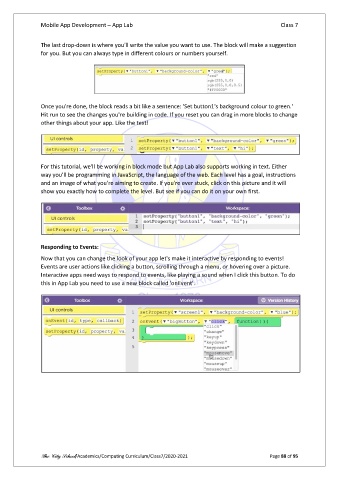
               The last drop-down is where you'll write the value you want to use. The block will make a suggestion
               for you. But you can always type in different colours or numbers yourself.


               Once you're done, the block reads a bit like a sentence: 'Set button1's background colour to green.'
               Hit run to see the changes you're building in code. If you reset you can drag in more blocks to change
               other things about your app. Like the text!


               For this tutorial, we'll be working in block mode but App Lab also supports working in text. Either
               way you'll be programming in JavaScript, the language of the web. Each level has a goal, instructions
               and an image of what you're aiming to create. If you're ever stuck, click on this picture and it will
               show you exactly how to complete the level. But see if you can do it on your own first.


               Responding to Events:
               Now that you can change the look of your app let's make it interactive by responding to events!
               Events are user actions like clicking a button, scrolling through a menu, or hovering over a picture.
               Interactive apps need ways to respond to events, like playing a sound when I click this button. To do
               this in App Lab you need to use a new block called 'onEvent'.


               The City School/Academics/Computing Curriculum/Class7/2020-2021                  Page 88 of 95

