


Page 12 - Refman_Brochures
P. 12
S Sh hi ip p I In ns st tr ru uc ct ti io on n & &
F Fe ee ed db ba ac ck k M Mo od du ul le e
R RE EF FM MA AN Nfor windows
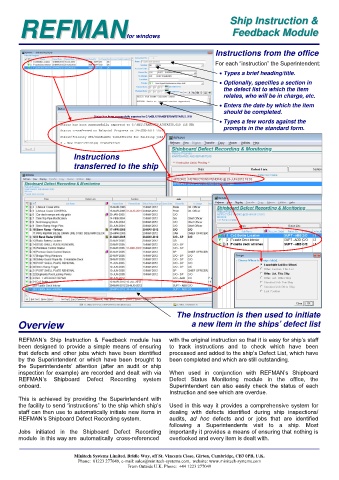
Instructions from the office
For each “instruction” the Superintendent:
Types a brief heading/title.
Optionally, specifies a section in
the defect list to which the item
relates, who will be in charge, etc.
Enters the date by which the item
should be completed.
Types a few words against the
prompts in the standard form.
Instructions
transferred to the ship
The Instruction is then used to initiate
Overview a new item in the ships’ defect list
REFMAN’s Ship Instruction & Feedback module has with the original instruction so that it is easy for ship’s staff
been designed to provide a simple means of ensuring to track instructions and to check which have been
that defects and other jobs which have been identified processed and added to the ship’s Defect List, which have
by the Superintendent or which have been brought to been completed and which are still outstanding.
the Superintendents’ attention (after an audit or ship
inspection for example) are recorded and dealt with via When used in conjunction with REFMAN’s Shipboard
REFMAN’s Shipboard Defect Recording system Defect Status Monitoring module in the office, the
onboard. Superintendent can also easily check the status of each
Instruction and see which are overdue.
This is achieved by providing the Superintendent with
the facility to send “instructions” to the ship which ship’s Used in this way it provides a comprehensive system for
staff can then use to automatically initiate new items in dealing with defects identified during ship inspections/
REFMAN’s Shipboard Defect Recording system. audits, ad hoc defects and or jobs that are identified
following a Superintendents visit to a ship. Most
Jobs initiated in the Shipboard Defect Recording importantly it provides a means of ensuring that nothing is
module in this way are automatically cross-referenced overlooked and every item is dealt with.
Minitech Systems Limited. Bridle Way, off St. Vincents Close, Girton, Cambridge, CB3 0PB, U.K.
Phone: 01223 277049, e-mail: sales@minitech-systems.com, website: www.minitech-systems.com
From Outside U.K. Phone: +44 1223 277049

