


Page 13 - Refman_Brochures
P. 13
REFMAN – Ship Instruction &                                        REFMAN – Ship Instruction &
       Feedback Module in the office.                                        Feedback Module onboard.

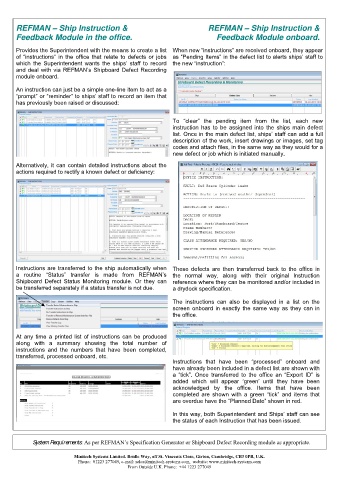
       Provides the Superintendent with the means to create a list  When new “instructions” are received onboard, they appear
       of  “instructions”  in  the  office  that  relate  to  defects  or  jobs  as “Pending Items” in the defect list to alerts ships’ staff to
       which  the  Superintendent  wants  the  ships’  staff  to  record  the new “instruction”:
       and deal with via REFMAN’s Shipboard Defect Recording
       module onboard.

       An instruction can just be a simple one-line item to act as a
       “prompt” or “reminder” to ships’ staff to record an item that
       has previously been raised or discussed:


                                                              To  “clear”  the  pending  item  from  the  list,  each  new
                                                              instruction  has  to  be  assigned  into  the  ships  main  defect
                                                              list. Once in the main defect list, ships’ staff can add a full
                                                              description of the work, insert drawings or images, set tag
                                                              codes and attach files, in the same way as they would for a
                                                              new defect or job which is initiated manually.

       Alternatively, it can contain detailed instructions about the
       actions required to rectify a known defect or deficiency:


       Instructions are transferred to the ship automatically when  These  defects  are  then  transferred  back  to  the  office  in
       a  routine  “Status”  transfer  is  made  from  REFMAN’s  the  normal  way,  along  with  their  original  Instruction
       Shipboard  Defect  Status  Monitoring  module.  Or  they  can  reference where they can be monitored and/or included in
       be transferred separately if a status transfer is not due.   a drydock specification.


                                                              The  instructions  can  also  be  displayed  in  a  list  on  the
                                                              screen onboard  in  exactly  the  same way  as  they can  in
                                                              the office.


       At  any  time  a  printed  list  of  instructions  can  be  produced
       along  with  a  summary  showing  the  total  number  of
       instructions  and  the  numbers  that  have  been  completed,
       transferred, processed onboard, etc.
                                                              Instructions  that  have  been  “processed”  onboard  and
                                                              have already been included in a defect list are shown with
                                                              a  “tick”.  Once  transferred  to  the  office  an  “Export  ID”  is
                                                              added  which  will  appear  ‘green’  until  they  have  been
                                                              acknowledged  by  the  office.  Items  that  have  been
                                                              completed  are  shown  with  a  green  “tick”  and  items  that
                                                              are overdue have the “Planned Date” shown in red.

                                                              In this way, both Superintendent and Ships’ staff can see
                                                             the status of each Instruction that has been issued.


            System Requirements: As per REFMAN’s Specification Generator or Shipboard Defect Recording module as appropriate.


                           Minitech Systems Limited. Bridle Way, off St. Vincents Close, Girton, Cambridge, CB3 0PB, U.K.
                            Phone:  01223 277049, e-mail: sales@minitech-systems.com,  website: www.minitech-systems.com
                                              From Outside U.K. Phone:  +44 1223 277049

