


Page 15 - Refman_Brochures
P. 15
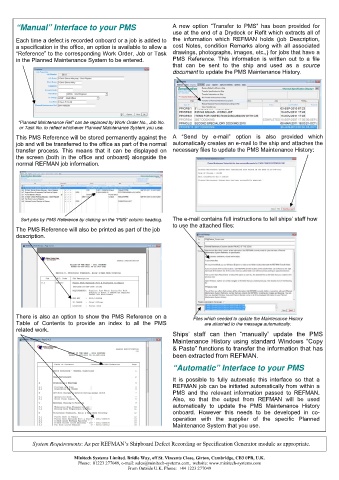
“Manual” Interface to your PMS                         A  new  option  “Transfer  to  PMS”  has  been  provided  for
                                                              use at the end of a Drydock or Refit which extracts all of
       Each time a defect is recorded onboard or a job is added to   the  information  which  REFMAN  holds  (job  Description,
       a specification in the office, an option is available to allow a   cost  Notes,  condition  Remarks  along  with  all  associated
       “Reference” to the corresponding Work Order, Job or Task   drawings, photographs, images, etc.,) for jobs that have a
       in the Planned Maintenance System to be entered.       PMS  Reference.  This  information  is  written  out  to  a  file
                                                              that  can  be  sent  to  the  ship  and  used  as  a  source
                                                              document to update the PMS Maintenance History.


       “Planned Maintenance Ref” can be replaced by Work Order No., Job No.
        or Task No. to reflect whichever Planned Maintenance System you use.

       This PMS Reference will be stored permanently against the  A  “Send  by  e-mail”  option  is  also  provided  which
       job and will be transferred to the office as part of the normal  automatically creates an e-mail to the ship and attaches the
       transfer  process.  This  means  that  it  can  be  displayed  on  necessary files to update the PMS Maintenance History:
       the  screen (both  in  the office and  onboard)  alongside  the
       normal REFMAN job information.


        Sort jobs by PMS Reference by clicking on the ‘PMS’ column heading.   The e-mail contains full instructions to tell ships’ staff how
                                                              to use the attached files:
       The PMS Reference will also be printed as part of the job
       description.


       There is also an option to show the PMS Reference on a        Files which needed to update the Maintenance History
       Table  of  Contents  to  provide  an  index  to  all  the  PMS    are attached to the message automatically.
       related work.
                                                              Ships’  staff  can  then  “manually”  update  the  PMS
                                                              Maintenance History using standard Windows “Copy
                                                              & Paste” functions to transfer the information that has
                                                              been extracted from REFMAN.

                                                              “Automatic” Interface to your PMS

                                                              It  is  possible  to  fully  automatic  this  interface  so  that  a
                                                              REFMAN job can be initiated automatically from within a
                                                              PMS  and  the  relevant  information  passed  to  REFMAN.
                                                              Also,  so  that  the  output  from  REFMAN  will  be  used
                                                              automatically  to  update  the  PMS  Maintenance  History
                                                              onboard.  However  this  needs  to  be  developed  in  co-
                                                              operation  with  the  supplier  of  the  specific  Planned
                                                              Maintenance System that you use.


            System Requirements: As per REFMAN’s Shipboard Defect Recording or Specification Generator module as appropriate.


                           Minitech Systems Limited. Bridle Way, off St. Vincents Close, Girton, Cambridge, CB3 0PB, U.K.
                            Phone:  01223 277049, e-mail: sales@minitech-systems.com,  website: www.minitech-systems.com
                                              From Outside U.K. Phone:  +44 1223 277049

