


Page 10 - Refman_Brochures
P. 10
S Sh hi ip pb bo oa ar rd d D De ef fe ec ct t
S St ta at tu us s M Mo on ni it to or ri in ng g
R RE EF FM MA AN Nfor windows
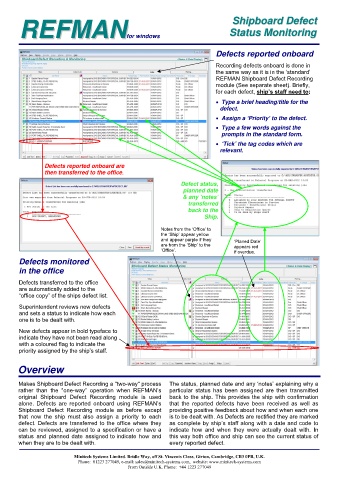
Defects reported onboard
Recording defects onboard is done in
the same way as it is in the ‘standard’
REFMAN Shipboard Defect Recording
module (See separate sheet). Briefly,
for each defect, ship’s staff need to:
Type a brief heading/title for the
defect.
Assign a ‘Priority’ to the defect.
Type a few words against the
prompts in the standard form.
‘Tick’ the tag codes which are
relevant.
Defects reported onboard are
then transferred to the office.
Defect status,
planned date
& any ‘notes’
transferred
back to the
Ship.
Notes from the ‘Office’ to
the ‘Ship’ appear yellow
and appear purple if they
are from the ‘Ship’ to the ‘Planed Date’
appears red
‘Office’. if overdue.
Defects monitored
in the office
Defects transferred to the office
are automatically added to the
“office copy” of the ships defect list.
Superintendent reviews new defects
and sets a status to indicate how each
one is to be dealt with.
New defects appear in bold typeface to
indicate they have not been read along
with a coloured flag to indicate the
priority assigned by the ship’s staff.
Overview
Makes Shipboard Defect Recording a "two-way" process The status, planned date and any ‘notes’ explaining why a
rather than the "one-way” operation when REFMAN’s particular status has been assigned are then transmitted
original Shipboard Defect Recording module is used back to the ship. This provides the ship with confirmation
alone. Defects are reported onboard using REFMAN’s that the reported defects have been received as well as
Shipboard Defect Recording module as before except providing positive feedback about how and when each one
that now the ship must also assign a priority to each is to be dealt with. As Defects are rectified they are marked
defect. Defects are transferred to the office where they as complete by ship’s staff along with a date and code to
can be reviewed, assigned to a specification or have a indicate how and when they were actually dealt with. In
status and planned date assigned to indicate how and this way both office and ship can see the current status of
when they are to be dealt with. every reported defect.
Minitech Systems Limited. Bridle Way, off St. Vincents Close, Girton, Cambridge, CB3 0PB, U.K.
Phone: 01223 277049, e-mail: sales@minitech-systems.com, website: www.minitech-systems.com
From Outside U.K. Phone: +44 1223 277049

