


Page 69 - Buletin JSKM 2021
P. 69
68


                              POWERPOINT TIP AND TRICK: RECORD YOUR SCREEN
                                                      Rafizah Kechil
                       PowerPoint has an easy screen recorder built in. It's ideal for a quick and painless
                recording.
                How to use the screen recorder in PowerPoint?
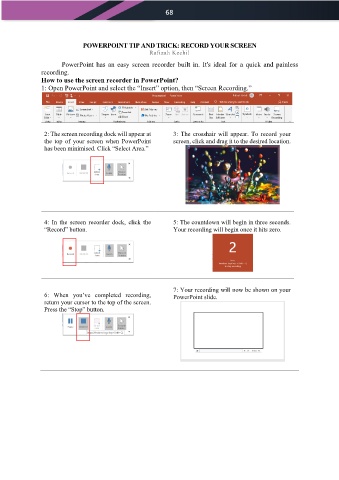
                1: Open PowerPoint and select the “Insert” option, then “Screen Recording.”


                 2: The screen recording dock will appear at   3:  The  crosshair  will  appear.  To  record  your
                 the  top  of  your  screen  when  PowerPoint   screen, click and drag it to the desired location.
                 has been minimised. Click “Select Area.”


                 4:  In  the  screen  recorder  dock,  click  the   5: The countdown will begin in three seconds.
                 “Record” button.                             Your recording will begin once it hits zero.


                                                              7: Your recording will now be shown on your
                 6:  When  you’ve  completed  recording,      PowerPoint slide.
                 return your cursor to the top of the screen.
                 Press the “Stop” button.

