


Page 40 - TCS ICT Book 8
P. 40
The City School  2021-2022


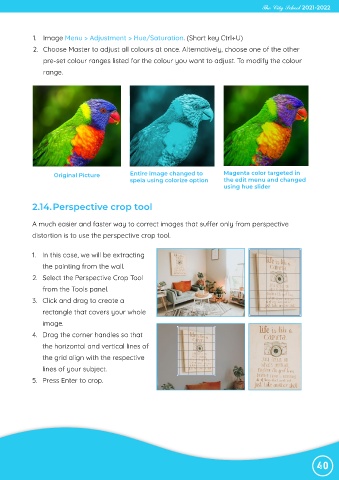
             1.  Image Menu > Adjustment > Hue/Saturation. (Short key Ctrl+U)

             2.  Choose Master to adjust all colours at once. Alternatively, choose one of the other
                pre-set colour ranges listed for the colour you want to adjust. To modify the colour

                range.


                    Original Picture           Entire image changed to          Magenta color targeted in
                                               speia using colorize option      the edit menu and changed
                                                                                using hue slider


            2.14. Perspective crop tool


            A much easier and faster way to correct images that suffer only from perspective
            distortion is to use the perspective crop tool.


            1.  In this case, we will be extracting
                the painting from the wall.

            2.  Select the Perspective Crop Tool
                from the Tools panel.

            3.  Click and drag to create a
                rectangle that covers your whole

                image.
            4.  Drag the corner handles so that

                the horizontal and vertical lines of
                the grid align with the respective

                lines of your subject.
            5.  Press Enter to crop.


                                                                                                                40

