


Page 41 - TCS ICT Book 8
P. 41
The City School  2021-2022


             2.15. Retouch Tools


             Retouch with the Healing Brush tool: The healing brush tool lets you correct
             imperfections, causing them to disappear into the surrounding image. Like the

             cloning tools, you use the Healing Brush tool to paint with sampled pixels from an
             image or pattern. However, the Healing Brush tool also matches the texture, lighting,

             transparency, and shading of the sampled pixels to the pixels being healed. As a                       Advance Imaging
             result, the repaired pixels blend seamlessly into the rest of the image.


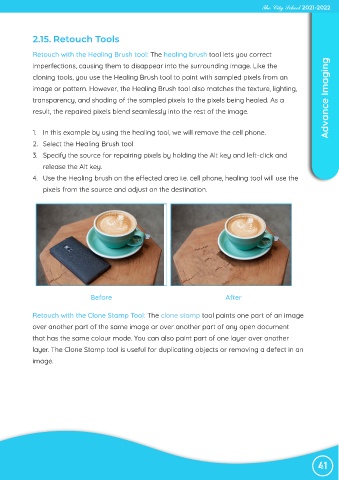
             1.  In this example by using the healing tool, we will remove the cell phone.
             2.  Select the Healing Brush tool

             3.  Specify the source for repairing pixels by holding the Alt key and left-click and
                release the Alt key.

             4.  Use the Healing brush on the effected area i.e. cell phone, healing tool will use the
                pixels from the source and adjust on the destination.


                                 Before                                         After


            Retouch with the Clone Stamp Tool: The clone stamp tool paints one part of an image
            over another part of the same image or over another part of any open document

            that has the same colour mode. You can also paint part of one layer over another

            layer. The Clone Stamp tool is useful for duplicating objects or removing a defect in an
            image.


                                                                                                                 41

