


Page 71 - TCS ICT Book 8
P. 71
The City School  2021-2022


             There are three options for sharing forms


             1.  Send and collect responses
             2.  Share as a template

             3.  Share to collaborate

             To share the form:

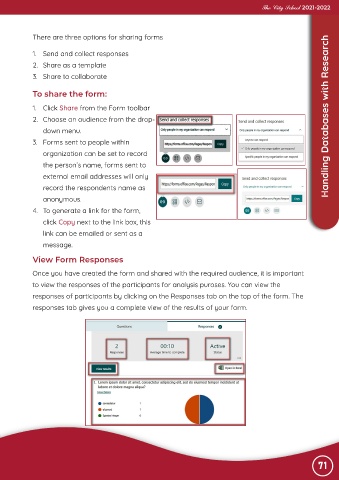
             1.  Click Share from the Form toolbar

             2.  Choose an audience from the drop-                                                 Advance Imaging  Handling Databases with Research

                down menu.
             3.  Forms sent to people within
                organization can be set to record

                the person’s name, forms sent to

                external email addresses will only
                record the respondents name as
                anonymous.

             4.  To generate a link for the form,

                click Copy next to the link box, this
                link can be emailed or sent as a
                message.


             View Form Responses

            Once you have created the form and shared with the required audience, it is important
            to view the responses of the participants for analysis puroses. You can view the

            responses of participants by clicking on the Responses tab on the top of the form. The
            responses tab gives you a complete view of the results of your form.


                                                                                                                 71

