


Page 68 - TCS ICT Book 8
P. 68
The City School  2021-2022


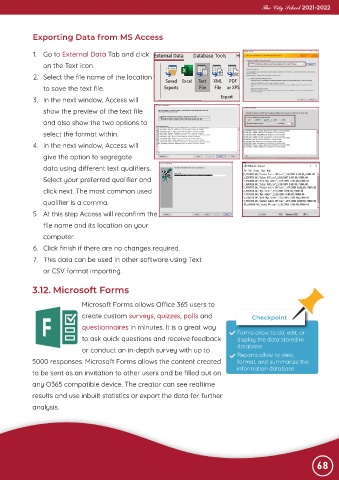
             Exporting Data from MS Access


             1.  Go to External Data Tab and click
                on the Text icon.

             2.  Select the file name of the location
                to save the text file.

             3.  In the next window, Access will
                show the preview of the text file

                and also show the two options to
                select the format within.

             4.  In the next window, Access will
                give the option to segregate

                data using different text qualifiers.
                Select your preferred qualifier and

                click next. The most common used
                qualifier is a comma.

             5.  At this step Access will reconfirm the
                file name and its location on your

                computer.
             6.  Click finish if there are no changes required.

             7.  This data can be used in other software using Text
                or CSV format importing.


            3.12. Microsoft Forms


                              Microsoft Forms allows Office 365 users to
                              create custom surveys, quizzes, polls and                  Checkpoint
                              questionnaires in minutes. It is a great way          Forms allow to dd, edit, or

                              to ask quick questions and receive feedback           display the data stored in

                              or conduct an in-depth survey with up to              database.
                                                                                    Reports allow to view,
            5000 responses. Microsoft Forms allows the content created              format, and summarize the
            to be sent as an invitation to other users and be filled out on         information database.

            any O365 compatible device. The creator can see realtime

            results and use inbuilt statistics or export the data for further
            analysis.


                                                                                                                68

