


Page 92 - TCS ICT Book 8
P. 92
The City School  2021-2022


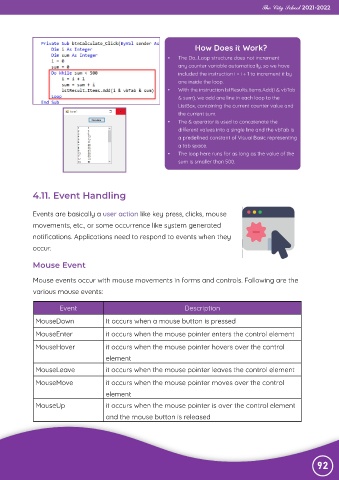
                                                                      How Does it Work?

                                                            •   The Do…Loop structure does not increment
                                                                any counter variable automatically, so we have
                                                                included the instruction i = i + 1 to increment it by
                                                                one inside the loop.
                                                            •   With the instruction lstResults.Items.Add(i & vbTab
                                                                & sum), we add one line in each loop to the
                                                                ListBox, containing the current counter value and
                                                                the current sum.
                                                            •   The & operator is used to concatenate the
                                                                different values into a single line and the vbTab is
                                                                a predefined constant of Visual Basic representing
                                                                a tab space.
                                                            •   The loop here runs for as long as the value of the
                                                                sum is smaller than 500.


             4.11. Event Handling


             Events are basically a user action like key press, clicks, mouse
             movements, etc., or some occurrence like system generated

             notifications. Applications need to respond to events when they
             occur.


             Mouse Event

             Mouse events occur with mouse movements in forms and controls. Following are the

             various mouse events:

                      Event                                       Description

              MouseDown               It occurs when a mouse button is pressed

              MouseEnter              it occurs when the mouse pointer enters the control element

              MouseHover              it occurs when the mouse pointer hovers over the control
                                      element

              MouseLeave              it occurs when the mouse pointer leaves the control element

              MouseMove               it occurs when the mouse pointer moves over the control
                                      element

              MouseUp                 it occurs when the mouse pointer is over the control element
                                      and the mouse button is released


                                                                                                                92

