


Page 91 - TCS ICT Book 8
P. 91
The City School  2021-2022


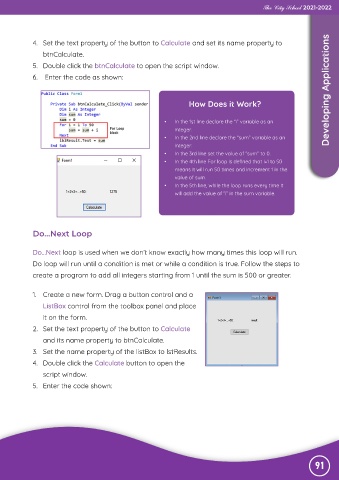
             4.  Set the text property of the button to Calculate and set its name property to

                btnCalculate.
             5.  Double click the btnCalculate to open the script window.

             6.   Enter the code as shown:


                                                                   How Does it Work?                                Developing Applications


                                                           •   In the 1st line declare the “i” variable as an
                                                              integer.
                                                           •   In the 2nd line declare the “sum” variable as an
                                                              integer.
                                                           •   In the 3rd line set the value of “sum” to 0.
                                                           •   In the 4th line For loop is defined that i=1 to 50
                                                              means it will run 50 times and increment 1 in the
                                                              value of sum.
                                                           •   In the 5th line, while the loop runs every time it
                                                              will add the value of “i” in the sum variable.


             Do...Next Loop


             Do...Next loop is used when we don’t know exactly how many times this loop will run.

             Do loop will run until a condition is met or while a condition is true. Follow the steps to
             create a program to add all integers starting from 1 until the sum is 500 or greater.


             1.  Create a new form. Drag a button control and a

                ListBox control from the toolbox panel and place
                it on the form.

             2.  Set the text property of the button to Calculate
                and its name property to btnCalculate.

             3.  Set the name property of the listBox to lstResults.
             4.  Double click the Calculate button to open the

                script window.
             5.  Enter the code shown:


                                                                                                                91

