


Page 33 - TCS ICT Book 5
P. 33
The City School  2021-2022


           Saving Customized Text Effects

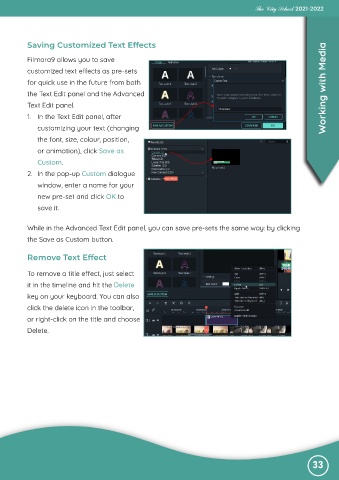
           Filmora9 allows you to save
           customized text effects as pre-sets

           for quick use in the future from both
           the Text Edit panel and the Advanced                                                                    Working with Media

           Text Edit panel.
           1.  In the Text Edit panel, after

              customizing your text (changing
              the font, size, colour, position,

              or animation), click Save as
              Custom.

           2.  In the pop-up Custom dialogue
              window, enter a name for your

              new pre-set and click OK to
              save it.


           While in the Advanced Text Edit panel, you can save pre-sets the same way: by clicking
           the Save as Custom button.


           Remove Text Effect


           To remove a title effect, just select
           it in the timeline and hit the Delete

           key on your keyboard. You can also
           click the delete icon in the toolbar,

           or right-click on the title and choose
           Delete.


                                                                                                               33

