


Page 30 - TCS ICT Book 5
P. 30
The City School  2021-2022


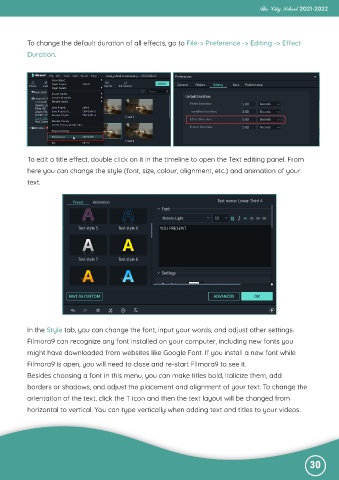
           To change the default duration of all effects, go to File-> Preference -> Editing -> Effect

           Duration.


           To edit a title effect, double click on it in the timeline to open the Text editing panel. From
           here you can change the style (font, size, colour, alignment, etc.) and animation of your

           text.


           In the Style tab, you can change the font, input your words, and adjust other settings.

           Filmora9 can recognize any font installed on your computer, including new fonts you
           might have downloaded from websites like Google Font. If you install a new font while

           Filmora9 is open, you will need to close and re-start Filmora9 to see it.
           Besides choosing a font in this menu, you can make titles bold, italicize them, add

           borders or shadows, and adjust the placement and alignment of your text. To change the
           orientation of the text, click the T icon and then the text layout will be changed from

           horizontal to vertical. You can type vertically when adding text and titles to your videos.


                                                                                                              30

