


Page 28 - TCS ICT Book 5
P. 28
The City School  2021-2022


           1.9.  Adding Text and Video Credits


           In Filmora9, there are
           openers, titles, lower

           3rds, subtitles and end
           credit templates. You

           can add a title or other
           text effect to your video

           easily using one of the
           customizable premade

           templates.
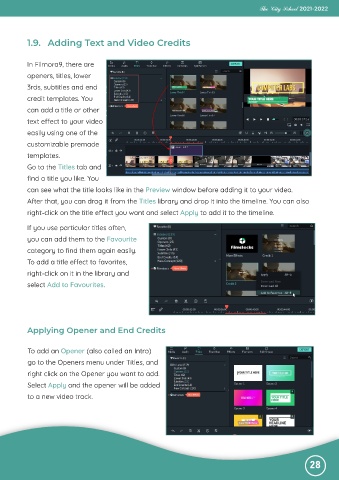
           Go to the Titles tab and

           find a title you like. You
           can see what the title looks like in the Preview window before adding it to your video.

           After that, you can drag it from the Titles library and drop it into the timeline. You can also
           right-click on the title effect you want and select Apply to add it to the timeline.


           If you use particular titles often,
           you can add them to the Favourite

           category to find them again easily.
           To add a title effect to favorites,

           right-click on it in the library and
           select Add to Favourites.


           Applying Opener and End Credits


           To add an Opener (also called an Intro)
           go to the Openers menu under Titles, and

           right click on the Opener you want to add.
           Select Apply and the opener will be added

           to a new video track.


                                                                                                              28

