


Page 88 - TCS ICT Book 5
P. 88
The City School  2021-2022


           3.13. Screen Modes


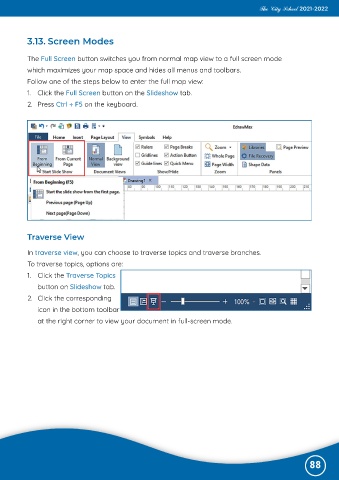
           The Full Screen button switches you from normal map view to a full screen mode
           which maximizes your map space and hides all menus and toolbars.

           Follow one of the steps below to enter the full map view:
           1.  Click the Full Screen button on the Slideshow tab.

           2.  Press Ctrl + F5 on the keyboard.


           Traverse View

           In traverse view, you can choose to traverse topics and traverse branches.

           To traverse topics, options are:
           1.  Click the Traverse Topics

              button on Slideshow tab.
           2.  Click the corresponding

              icon in the bottom toolbar
              at the right corner to view your document in full-screen mode.


                                                                                                              88

