


Page 20 - TCS ICT Book 4
P. 20
The City School  2021-2022


           3.  A dialogue box will appear. Select Delete entire row or Delete entire column, then click
              OK.

           4.  The column or row will be deleted.


           1.7.  Find and Replace Words


           When you’re working with longer documents, it can be difficult and time consuming to
           locate a specific word or phrase. Word can automatically search your document using the

           Find feature, and it allows you to quickly change words or phrases using Replace.


           To Find Text


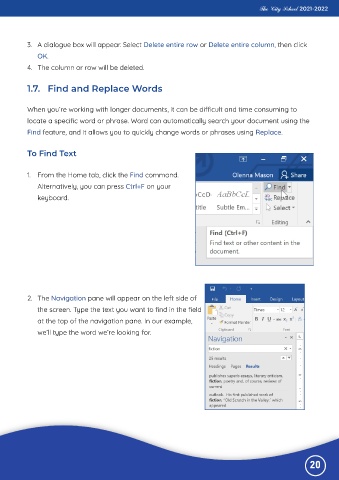
           1.  From the Home tab, click the Find command.

              Alternatively, you can press Ctrl+F on your
              keyboard.


           2.  The Navigation pane will appear on the left side of

              the screen. Type the text you want to find in the field
              at the top of the navigation pane. In our example,

              we’ll type the word we’re looking for.


                                                                                                              20

