


Page 22 - TCS ICT Book 4
P. 22
The City School  2021-2022


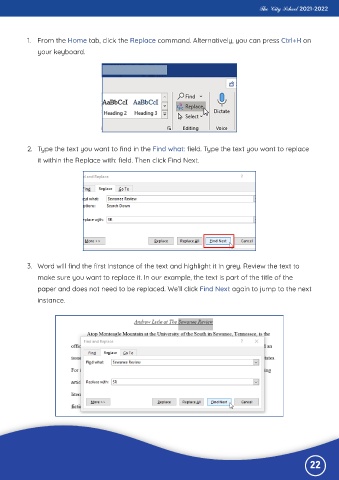
           1.  From the Home tab, click the Replace command. Alternatively, you can press Ctrl+H on
              your keyboard.


           2.  Type the text you want to find in the Find what: field. Type the text you want to replace
              it within the Replace with: field. Then click Find Next.


           3.  Word will find the first instance of the text and highlight it in grey. Review the text to

              make sure you want to replace it. In our example, the text is part of the title of the
              paper and does not need to be replaced. We’ll click Find Next again to jump to the next

              instance.


                                                                                                              22

