


Page 70 - TCS ICT Book 4
P. 70
The City School  2021-2022


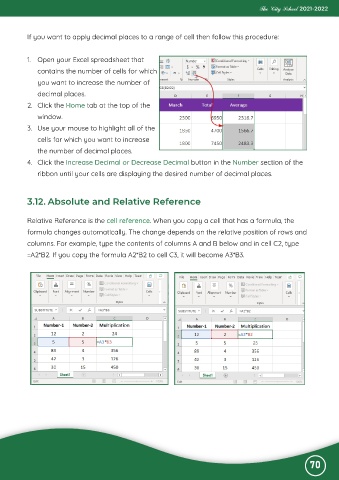
           If you want to apply decimal places to a range of cell then follow this procedure:


           1.  Open your Excel spreadsheet that
              contains the number of cells for which

              you want to increase the number of
              decimal places.

           2.  Click the Home tab at the top of the
              window.

           3.  Use your mouse to highlight all of the
              cells for which you want to increase

              the number of decimal places.
           4.  Click the Increase Decimal or Decrease Decimal button in the Number section of the

              ribbon until your cells are displaying the desired number of decimal places.


           3.12. Absolute and Relative Reference


           Relative Reference is the cell reference. When you copy a cell that has a formula, the

           formula changes automatically. The change depends on the relative position of rows and
           columns. For example, type the contents of columns A and B below and in cell C2, type

           =A2*B2. If you copy the formula A2*B2 to cell C3, it will become A3*B3.


                                                                                                              70

