


Page 28 - TCS ICT Book 7
P. 28
The City School  2021-2022


             1.9.  Conditional Formatting


             Conditional formatting allows you to
             automatically apply formatting—such as                        Checkpoint

             colors, icons, and data bars—to one or
             more cells based on the cell value. To do               Column/bar chart is used to illustrate
                                                                     comparisons between a series of data.
             this, you’ll need to create a conditional               Line chart shows the changes in data
                                                                     over a period of time.
             formatting rule. For example, a conditional
                                                                     Pie chart shows the relationship of the
             formatting rule might be: If the value is less          parts to the whole.
             than $2000, color the cell red. By applying

             this rule, you’d be able to quickly see which cells contain values less
             than $2000.


             Applying Conditional Formatting


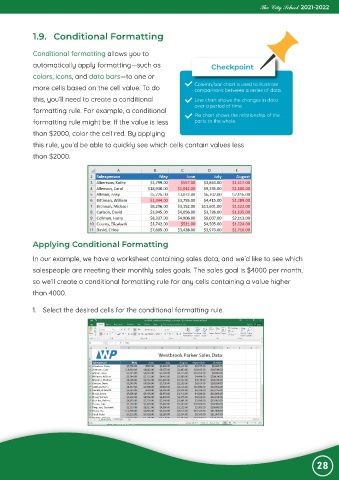
             In our example, we have a worksheet containing sales data, and we’d like to see which
             salespeople are meeting their monthly sales goals. The sales goal is $4000 per month,
             so we’ll create a conditional formatting rule for any cells containing a value higher

             than 4000.


            1.  Select the desired cells for the conditional formatting rule.


                                                                                                                28

