


Page 104 - Learn To Program With Scratch
P. 104
Using Nested Procedures

                         As we noted earlier, a procedure should be designed to perform a single,
                         well-defined task. To execute multiple tasks, it is perfectly legal—and in
                         many cases desirable—to have one procedure call another as part of its
                         execution path. Nesting procedures this way gives you great flexibility in
                         structuring and organizing your programs.
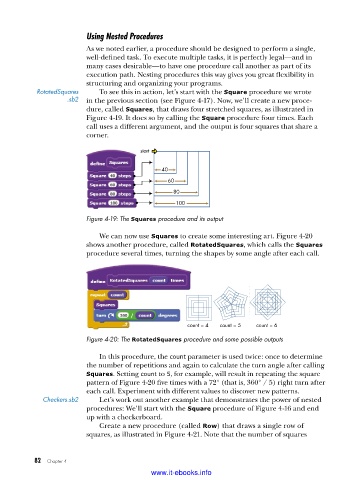
           RotatedSquares    To see this in action, let’s start with the Square procedure we wrote
                     .sb2  in the previous section (see Figure 4-17). Now, we’ll create a new proce-
                         dure, called Squares, that draws four stretched squares, as illustrated in
                         Figure 4-19. It does so by calling the Square procedure four times. Each
                         call uses a different argument, and the output is four squares that share a
                         corner.

                                        start

                                              40
                                                60
                                                 80
                                                  100
                         Figure 4-19: The Squares procedure and its output

                             We can now use Squares to create some interesting art. Figure 4-20
                         shows another procedure, called RotatedSquares, which calls the Squares
                         procedure several times, turning the shapes by some angle after each call.


                                                     count = 4   count = 5  count = 6
                         Figure 4-20: The RotatedSquares procedure and some possible outputs

                             In this procedure, the count parameter is used twice: once to determine
                         the number of repetitions and again to calculate the turn angle after calling
                         Squares. Setting count to 5, for example, will result in repeating the square
                         pattern of Figure 4-20 five times with a 72° (that is, 360° / 5) right turn after
                         each call. Experiment with different values to discover new patterns.
             Checkers .sb2   Let’s work out another example that demonstrates the power of nested
                         procedures: We’ll start with the Square procedure of Figure 4-16 and end
                         up with a checkerboard.
                             Create a new procedure (called Row) that draws a single row of
                         squares, as illustrated in Figure 4-21. Note that the number of squares


           82   Chapter 4
                                           www.it-ebooks.info

