


Page 99 - Learn To Program With Scratch
P. 99
running without Screen refreSh
                             Implementing the DrawFlower procedure with custom blocks brings up
                             another feature that can shorten the execution time of the drawing script . To
                             demonstrate, perform the following:
                             1 .  Right-click the DrawFlower block under the More Blocks palette and
                                 select edit from the pop-up menu . This should bring up the dialog from
                                 Figure 4-11, except that the title will be Edit Block instead of New Block .
                             2 .  Click the arrow next to Options, check the Run without screen refresh box
                                 and click OK (see Figure 4-15) .
                             3 .  Now, click the mouse on the Stage and see what happens . Instead of
                                 seeing the individual rotating and stamping steps as the five flowers are
                                 drawn, you should see them appear on the Stage almost at once . Here is
                                 an explanation of what’s happening .
                                 The DrawFlower procedure contains many blocks that change a sprite’s
                             appearance, including set color, set brightness, set size, and stamp .
                             After executing such a block, Scratch normally pauses for a while to refresh (that
                             is, redraw) the screen . This is why we were able to see the drawing progress
                             when the application ran before .
                                 If you select the Run without screen refresh option, the blocks will run with-
                             out pausing to refresh the screen, allowing the procedure to run much faster .
                             The screen will refresh after Scratch executes the entire procedure .
                                 In addition to speeding up a procedure, the Run without screen refresh
                             option helps to prevent the flickering that repeated redrawing can cause .


                          Passing Parameters to Custom Blocks
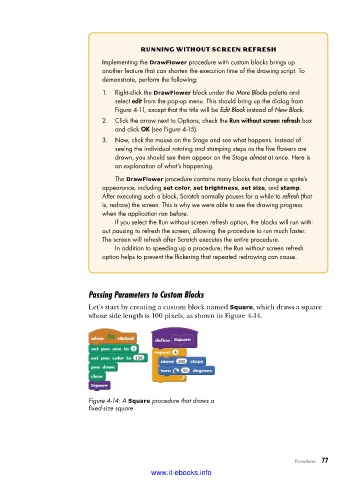
                          Let’s start by creating a custom block named Square, which draws a square
                          whose side length is 100 pixels, as shown in Figure 4-14.


                          Figure 4-14: A Square procedure that draws a
                          fixed-size square


                                                                                   Procedures   77

                                           www.it-ebooks.info

