


Page 162 - Learn To Program With Scratch
P. 162
Scratch Projects
                         The new commands you’ve learned in this chapter should allow you to cre-
                         ate a wide range of useful Scratch applications, and hopefully the projects
                         I present in this section will give you some ideas for your own projects. I
                         encourage you try out these applications, understand how they work, and
                         then think of ways to enhance them.

                         Guess My Coordinates

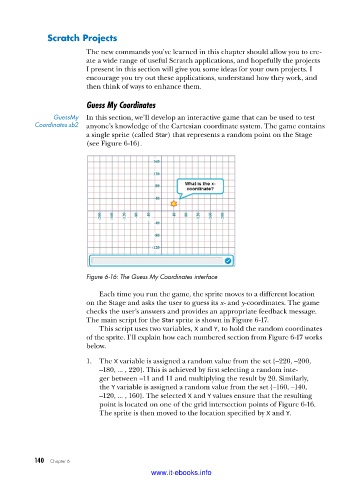
                GuessMy   In this section, we’ll develop an interactive game that can be used to test
           Coordinates .sb2  anyone’s knowledge of the Cartesian coordinate system. The game contains
                         a single sprite (called Star) that represents a random point on the Stage
                         (see Figure 6-16).


                         Figure 6-16: The Guess My Coordinates interface

                             Each time you run the game, the sprite moves to a different location
                         on the Stage and asks the user to guess its x- and y-coordinates. The game
                         checks the user’s answers and provides an appropriate feedback message.
                         The main script for the Star sprite is shown in Figure 6-17.
                             This script uses two variables, X and Y, to hold the random coordinates
                         of the sprite. I’ll explain how each numbered section from Figure 6-17 works
                         below.

                         1.  The X variable is assigned a random value from the set {–220, –200,
                             –180, ... , 220}. This is achieved by first selecting a random inte-
                             ger between –11 and 11 and multiplying the result by 20. Similarly,
                             the Y variable is assigned a random value from the set {–160, –140,
                             –120, ... , 160}. The selected X and Y values ensure that the resulting
                             point is located on one of the grid intersection points of Figure 6-16.
                             The sprite is then moved to the location specified by X and Y.


           140   Chapter 6
                                           www.it-ebooks.info

